Scotiabank Onboarding
The problem it solves
New employees at large organizations often arrive on day one without a clear, guided path to get their profile, tools, and information set up — leading to a fragmented and stressful first experience.
Who it's for
New Scotiabank employees navigating their first day, and the HR teams responsible for making that experience feel seamless and human.
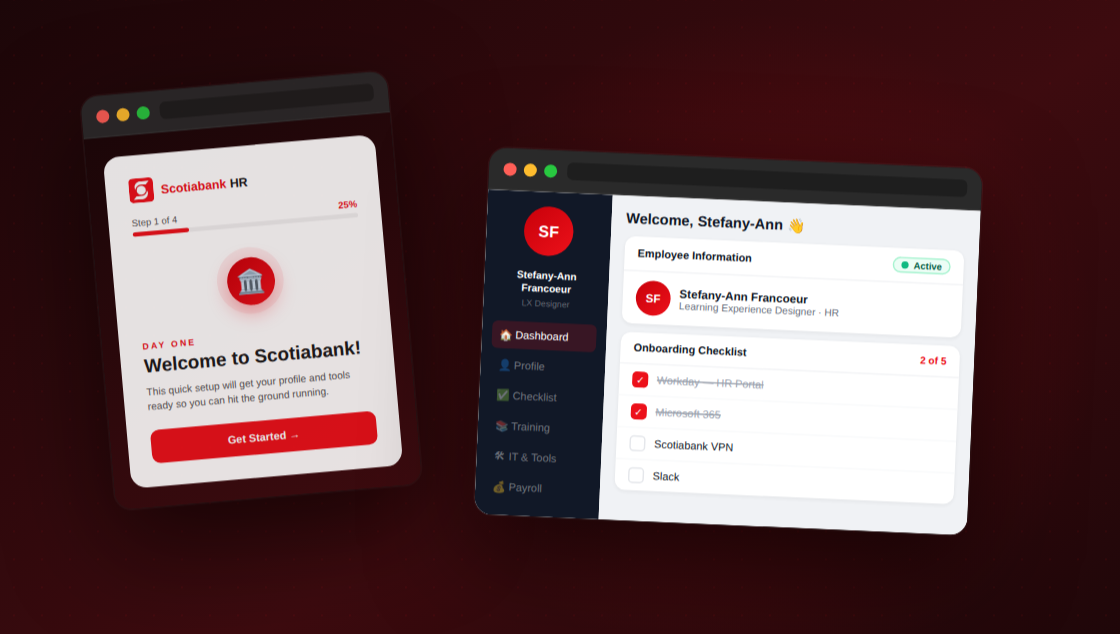
Key design decisions made
- Reducing cognitive load on day one — by pre-filling the form with HR data, the employee isn't asked to recall and re-enter information they've already provided. The mental effort shifts from "fill this out" to "just confirm this is right," which is a much lighter ask during an already overwhelming first day.
- Making system status visible — when an employee edits a pre-filled field, an amber "Pending approval" badge appears immediately on that label. This pattern (borrowed from Nielsen's first usability heuristic) ensures the employee always knows the state of their data without having to ask anyone or wait for a confirmation email.
- Progressive disclosure through a multi-step flow — rather than presenting one long form, the experience is broken into four focused screens, each with a single clear goal. This lowers the perceived effort of onboarding and gives the employee a sense of forward momentum through the progress bar.
What I'd add next if this were a real product
- A manager-facing dashboard where HR and direct managers can see which new employees have completed their onboarding steps, approve pending data changes, and send nudges for incomplete items — closing the loop on the approval workflow shown in the prototype.
- Persistent progress saved to a profile — so if an employee closes the portal and returns later, their checklist state is preserved and they can pick up exactly where they left off rather than starting from scratch.